
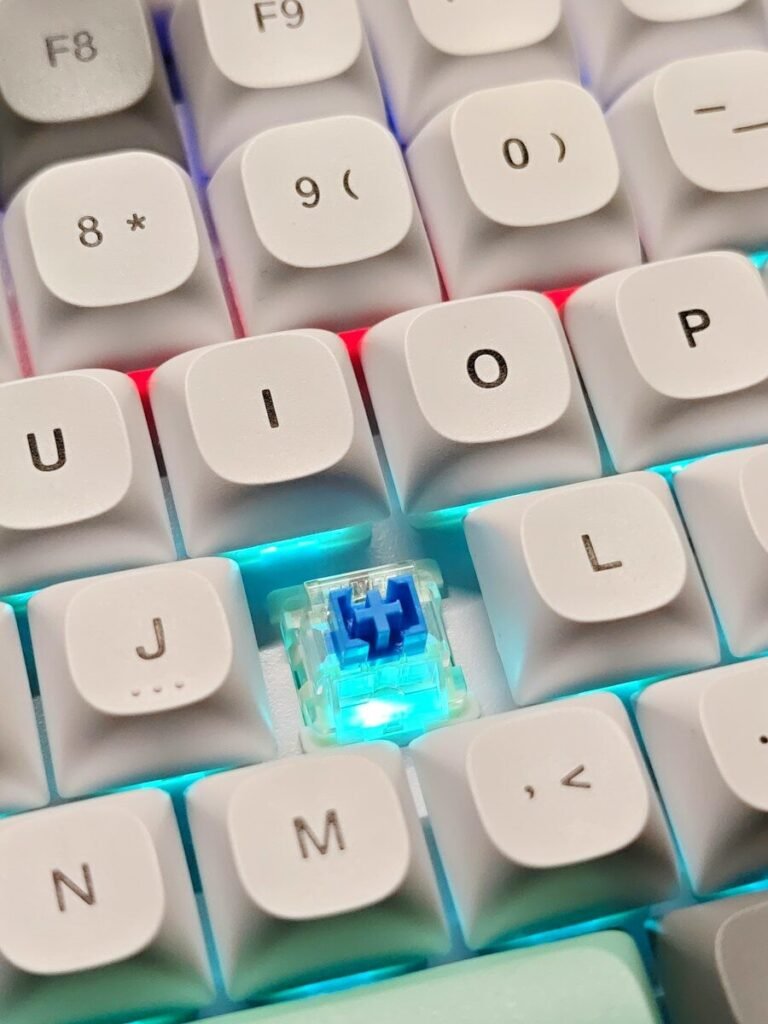
Mechanical keyboards have a reputation problem: enthusiasts speak in a dense dialect of switches, keycaps, and layouts that can make a curious beginner bounce right off. But underneath the jargon is a simple idea — a keyboard where every key has its own physical switch, giving you typing feel and durability that membrane keyboards rarely match. This guide translates everything into plain language so you can buy your first mechanical keyboard with confidence.
What Makes a Keyboard Mechanical?
Under every keycap of a mechanical keyboard sits an individual mechanical switch — a small spring-loaded mechanism that registers the keypress. Standard membrane keyboards, by contrast, use a single rubber sheet under all keys. The result: mechanical keys feel more precise, respond more consistently, and typically last far longer — often rated for tens of millions of presses per key.
Why people switch
Typing feel is the headline reason. Mechanical keys give clear physical feedback that many typists find more comfortable and satisfying over long sessions. Gamers value fast, consistent actuation. And because individual switches can be replaced on many models, a good mechanical keyboard can be repaired rather than thrown away when one key misbehaves.
The parts in plain English
A mechanical keyboard has a few main parts. The switch is the mechanism under each key. The keycap is the plastic top your finger touches. The plate and case hold everything together and shape the sound. Stabilizers are little helper mechanisms under wide keys like the spacebar that keep them level. Knowing these four terms covers most of what beginners encounter.
Switches Explained in Plain English
Switches are the heart of the keyboard, and they come in three broad families. Linear switches press down smoothly with no bump — quiet and consistent, popular for gaming. Tactile switches add a small bump you feel halfway down, confirming the press without needing to bottom out — a favorite for typing. Clicky switches add an audible click to that bump — satisfying for some, maddening for coworkers.
Colors are not standards
You will see switches described by color — red, brown, blue are the classic trio. But colors are manufacturer conventions, not universal specs: a brown switch from one brand may feel different from another’s. Use colors as a starting hint (reds lean linear, blues lean clicky), then check the actual feel description and, ideally, test before buying.
How much does switch choice matter?
More than any other factor for how the keyboard feels, but less than the internet suggests for how you perform. Most beginners adapt to any decent switch within a week. Pick a family that matches your use — tactile for mixed typing, linear for gaming or quiet offices — and do not agonize.
Actuation, travel, and force in one paragraph
Three specs describe a switch’s feel. Actuation point is how far down the key registers — usually around halfway. Travel is the total distance the key moves. Operating force is how hard you must press. Lighter switches tire fingers less; heavier ones resist accidental presses. Most beginner-friendly switches sit in the comfortable middle.
Size and Layout: How Much Keyboard Do You Need?
Keyboards come in several sizes. Full-size includes the number pad — great for spreadsheets, bulky for small desks. Tenkeyless (TKL) drops the number pad, keeping arrows and function keys: the most popular compromise. Compact 65 and 75 percent layouts squeeze arrows and a few keys into a smaller footprint, while 60 percent drops arrows entirely, accessing them through a function layer.
The beginner-friendly pick
Start with full-size or tenkeyless. They need no relearning — every key is where your muscle memory expects. Compact layouts are wonderful once you are comfortable, but learning a new layout and a new typing feel at once is asking a lot.
What is a function layer?
On compact keyboards, holding the Fn key turns other keys into the missing ones — Fn plus a letter becomes an arrow key, for example. It sounds awkward but becomes second nature within days. Still, it is one more thing to learn, which is why beginners are better served by standard layouts.
Keycaps: The Part You Touch
Keycaps — the plastic tops — affect feel, sound, and looks. The two common plastics are ABS, which is smooth and common on cheaper boards but can develop shine with heavy use, and PBT, which has a drier texture and resists shine. PBT is generally the nicer long-term material and worth seeking on a keyboard you will use daily.
Profiles and legends
Keycap shape (profile) changes how your fingers land — most stock sets are fine for beginners. Printed legends vary too: standard printed letters wear over time, while double-shot or dye-sublimated legends last far longer. This is a detail to appreciate later, not a buying blocker now.
Sound: What to Expect
Mechanical keyboards are often louder than membrane ones, but how loud depends on the switch and the case. Clicky switches are the loudest; linear and tactile switches with some case dampening can be only slightly louder than a normal keyboard. If you share space, favor tactile or linear switches and look for boards marketed as quiet or dampened — and know that desk mats and rooms change perceived noise a lot.
Ways to quiet a loud board
If your board is louder than you like, you have options short of replacing it. A thick desk mat absorbs a surprising amount of sound. O-ring dampeners under keycaps soften bottoming out. And simply typing with a lighter touch — not slamming keys to the bottom — quiets any keyboard dramatically.
Wired vs Wireless
Wired keyboards are simple, cheaper, and never need charging — still the default recommendation for a first board. Wireless 2.4 GHz models are effectively lag-free for most people and tidy up the desk; Bluetooth adds multi-device switching at the cost of slight latency. Battery life on modern wireless boards is measured in weeks or months with backlighting off. If you go wireless, check that it can also run wired, so a dead battery never stops you.
What About Hot-Swappable?
Hot-swappable boards let you pull switches out and push new ones in without soldering. For a beginner, this is the single most useful feature to have: it means your switch choice is not permanent, and a broken switch is a two-minute fix. It adds a little to the price and is worth it.
Ergonomics: Typing Without the Ache
A better keyboard can reduce strain, but only as part of good habits. Keep wrists straight and floating rather than bent upward — wrist rests are for resting between typing, not for propping wrists up while you type. Position the keyboard so elbows stay near your sides at roughly a right angle. Take short breaks; no switch type substitutes for movement.
Split and tented options
Once you are comfortable with the basics, ergonomic designs — split keyboards, tented angles, thumb clusters — can help persistent discomfort. These are advanced territory with real learning curves; master a standard mechanical board first, then explore if your body asks for more.
Backlighting and Extra Features
RGB backlighting looks great and helps in dark rooms; single-color backlighting does the same job for less. Beyond lighting, useful extras include a volume knob or media keys, programmable layers for custom shortcuts, and sturdy build quality — a board with some heft stays put while you type aggressively. Treat software customization as a bonus, not a requirement.
Cleaning and Maintenance
Mechanical keyboards are easy to keep clean, which is part of their longevity story. Shake out crumbs regularly, wipe keycaps with a slightly damp cloth, and every year or so pull the keycaps with a keycap puller for a deeper clean. Compressed air handles dust between switches. Because parts are replaceable, a well-kept board can serve for a decade.
How to Buy Your First One
Set a budget that reflects a daily-use tool, not a toy — entry-level mechanical boards are affordable, and the jump to mid-range buys noticeably better switches and keycaps. Buy from a retailer with a good return policy so you can live with the feel for a week. And consider a cheap switch tester first: a small board of sample switches that lets your fingers vote before your wallet does.
A simple decision checklist
Run through these five questions: full-size or tenkeyless for layout; linear, tactile, or clicky for switches; wired or wireless for connection; PBT keycaps if available; hot-swappable if the budget stretches. Answer those and you have narrowed hundreds of options to a handful of great first boards.
The Bottom Line
Start simple: tenkeyless or full-size, tactile or linear switches, PBT keycaps if you can get them, hot-swappable if the budget allows. Ignore the deep hobbyist rabbit holes — lubing switches, custom cables, artisan keycaps — until you know you enjoy the hobby. The right first mechanical keyboard is the one that makes typing feel good on day one.
Frequently Asked Questions
Are mechanical keyboards better for typing?
Most people find them more comfortable and precise thanks to consistent, individual switches — but the best keyboard is the one that feels good to you. Try before committing if you can.
Are they all loud?
No. Clicky switches are loud, but linear and tactile switches in a dampened case can be office-appropriate. Noise depends on switch, case, keycaps, and desk — not just the fact that it is mechanical.
Do I need to solder anything?
Not with a hot-swappable board — switches pull out and press in by hand. Soldering only enters the picture with the cheapest fixed-switch boards or advanced custom builds.
How long do mechanical keyboards last?
Switches are typically rated for tens of millions of keypresses — many years of heavy use. Keycaps may shine or wear sooner, but they are replaceable on standard layouts.
Can I use one with a Mac or a tablet?
Yes. Most boards work over USB with any modern computer, and Bluetooth models pair with tablets and phones. Check for Mac-compatible key legends or a Mac mode switch if that matters to you.
Is a mechanical keyboard worth it for non-gamers?
Absolutely, if you type a lot. Writers, programmers, and office workers benefit just as much from comfortable, durable switches — gaming is only one use case among many.